
Choose the record you want to keep
| Format | You keep | Main consideration |
|---|---|---|
| Written book | Handwritten names and wishes. | Writing space and comfortable pens. |
| Instant-photo album | Prints beside handwritten notes. | Film, extra copies and album assembly. |
| Digital photo guestbook | Photos and messages together. | Phone access and receiving your book. |
| Audio guestbook | Guests' voices. | A quiet recording spot. |
| Video guestbook | Voices, faces and expressions. | Light, sound and comfort on camera. |
| Cards or artwork | Messages to sort or display. | Storage and space for contributions. |
None is automatically more meaningful than another. A signature records attendance; a longer note tells you something about the person and your relationship. Decide whether you want quick wishes, photographs, stories or a guest takeaway.
If your venue provides a signing book, you can keep it. Put a second activity somewhere guests have time to stop, rather than asking everyone to complete both while registering. Tell the venue whether its book still belongs on the welcome table.
Written books and handwritten wishes
An open book lets guests leave their names, a wish or a memory in their own handwriting. It suits couples who want something they can pick up and read without a device.
Choose pages with enough space for the messages you want. Test the pens on that paper, set out a completed example and give guests somewhere comfortable to write. A book that only opens flat with one hand is awkward to use while holding a drink.
If you want relatives to tell longer stories, invite those contributions before the wedding. The reception can then be a place to add a shorter wish, without asking people to compose a letter between greetings and dinner.
Instant photos beside handwritten messages
An instant-photo album pairs a picture taken at the wedding with words written beside it. Guests take a photograph, mount the print and add their message. You leave with a physical book whose pages were made together during the reception.
Plan who handles the camera, replaces film and helps with the album. If guests also take a print home, that changes the number of prints you need. A camera that produces one instant photograph does not automatically make a second identical copy.
The photo guestbook setup guide covers sample pages, print copies, mounting and supplies. Choose this format if assembling the book is part of what you enjoy; a digital guestbook removes the page assembly but gives you a different record.
Digital photo guestbooks and receipt keepsakes
A digital photo guestbook keeps pictures and messages together for you to browse afterwards. With Monotone’s wedding photo guestbook, guests take a new photo on their own phone, add an optional note or drawing and collect a custom black-and-white receipt print.
An on-site operator handles printing. The photo and optional message stay together in your digital guestbook, while the receipt can carry your names, date and chosen artwork. See the customisation examples to judge the design.
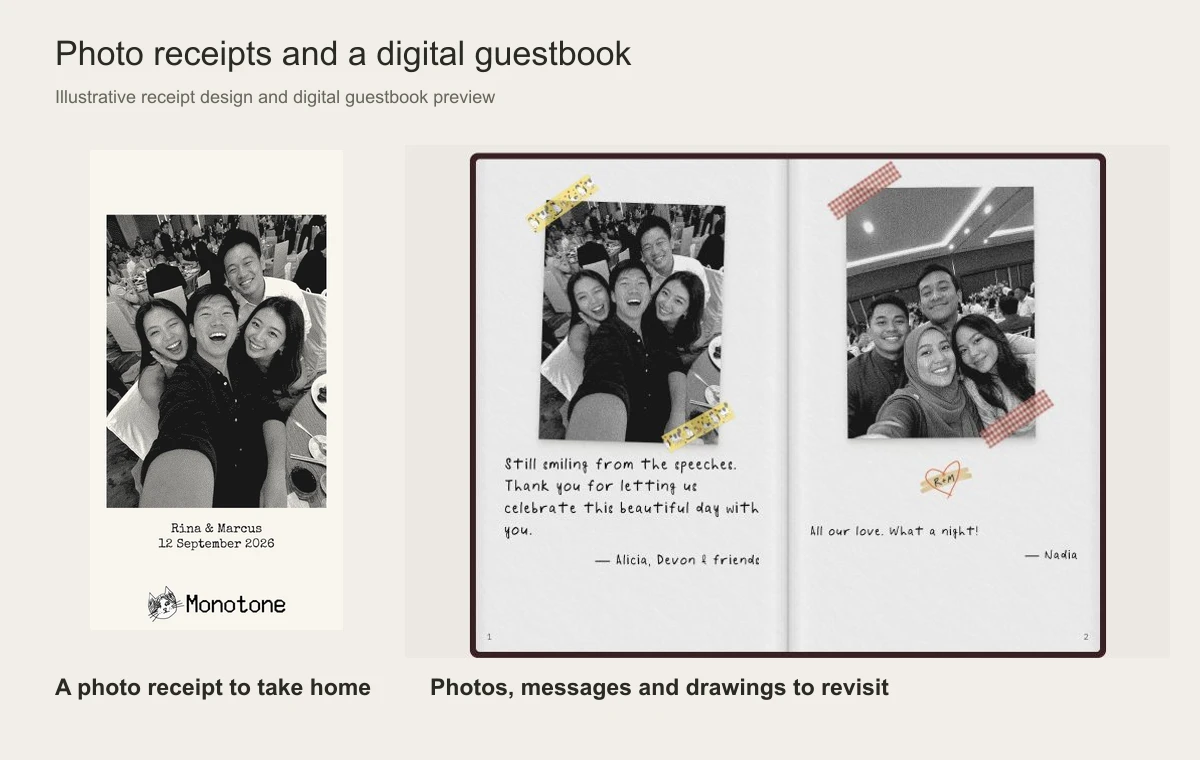
Friends can share a phone for a group photo, and guests can take another photo while the event remains open. Print copies follow the allowance agreed for your event; confirm it if you want separate copies for everyone in a group.
Monotone uses new camera photos rather than uploads from the phone's library. If you mainly want pictures guests have already taken, use a shared album or upload service. The guest photo guide explains that choice.
A written book gives guests room for longer letters. An audio guestbook keeps their voices, while video lets you see and hear their messages. Compare those formats if they are closer to what you would enjoy keeping.
Audio and video messages
An audio guestbook lets people speak directly to you, whether they leave a short wish or tell a story. A telephone-style recorder gives the activity a familiar starting point. Try its instructions and recording controls before deciding where it belongs.
Place audio recording away from speakers and busy service areas. Ask for a sample of the delivered files, how recordings are separated and how you receive them. Octopus Reels offers an audio guestbook example; confirm its current equipment and service scope directly.
Video adds expressions and gestures to the voice. It also asks guests to face a camera, so leave room for people who would rather write. Test lighting and sound together, and agree whether you receive individual recordings or an edited film.
Message cards and display objects
Loose cards let several guests write at once, including at their dining tables. Afterwards, you can keep them in a box or assemble them into a book. Give one person responsibility for gathering them before tables are cleared.
A signing frame, wooden pieces or shared artwork can become something to display at home. Choose the finished size first, then check how much room each guest has to write. Test the intended pen on the actual material and agree framing or finishing requirements.
Compare what you buy or hire
A book purchase, a couriered recorder and a staffed photo service include different work. Compare the full cost for the format you want, including the supplies and help that you would otherwise provide.
- Book or display: include personalisation, pens, signs and any framing.
- Instant-photo album: include camera hire or purchase, film, album, mounting and spare supplies.
- Audio or video hire: confirm delivery, setup, instructions, return arrangements, file delivery and any deposit.
- Staffed service: confirm the hours, equipment, copies, design, collection and files you receive.
For staffed photo formats, the wedding photo booth cost guide gives dated, named package examples. Treat a supplier's advertised price as a starting point for your own quote; it does not establish what every wedding guestbook should cost.
Give guests time and room to contribute
Place the guestbook where guests can pause without blocking another task. A visible station helps only if the programme gives people time to use it.
- After registration: keep the writing or photo area beyond the welcome queue and ang bao table.
- In the reception area: leave room for people to stop, put down a drink and understand the example. Choose a quieter spot for recordings.
- At dining tables: cards reach people who prefer to stay seated. Arrange collection before the venue clears the table.
Show one finished example, keep supplies nearby and name someone who can help. Guests should be free to contribute together or decline. A group photo may represent several people; do not equate guest count with the number of pages or recordings you will receive.
For a format used one group at a time, ask how long a complete contribution takes, including instructions and collection. Compare that with the time guests are actually free. Keep an easier written option only if it adds something you want.
Three prompts you can use
Choose a prompt that makes sense for your guests and the kind of message you want. These examples offer different starting points; people can leave their own wish instead.
- “What should we remember about today?” invites a detail such as the song everyone joined in with.
- “Where should we go for an anniversary meal?” invites a place and a reason you might enjoy it.
- “Tell us how you know us.” gives a group photograph context, such as “Your Tuesday badminton friends”.
Use one main prompt at the station. A short wish is enough for someone who does not want to tell a story, and names help you recognise a contribution later.
Collect and keep the guestbook
Before booking, ask to see the finished album, files or guestbook you would receive. A styled recorder or display is only part of the service; the contributions are what you will return to afterwards.
- Physical items: name the person who gathers the book, loose cards and unused prints, then takes them home.
- Audio and video: confirm file format, raw or edited delivery, download deadline and any hosting period.
- Digital photos and messages: confirm access, downloads, who can view them and how removals are requested.
- After delivery: check the collection, make your agreed downloads and keep a backup you control.
- Display pieces: follow the maker's care and mounting instructions; check any finishing work before applying it yourself.
Tell guests how their contributions will be used and who will see them. Keep the invitation separate from any plan to post selected messages or images publicly; ask permission for the material you want to share.
Planning an event?
Get in touch for availability and pricing.
Contact usSee the wedding photo guestbook